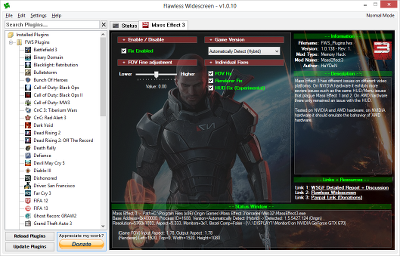
Mass Effect 3 Plugin
Flawless Widescreen was created in an effort to make it easier to craft fixes and patches to get games functioning correctly in UltraWide/Surround/Eyefinity gaming resolutions, often developers neglect these types of users leaving them to fend for themselves and find their own solutions, or in some unfortunate cases - live without the wonderful world of ultra-wide support.
With simplicity in mind, designed to be as simple as possible to use - simply select a supported game from the list, configure any basic desired configurable options and launch your game.
- Repository based plugins/modules with autonomous updating and version checking.
- Pure Win32 and C++ - fast with low memory utilization, C++ classes exposed to LUA for powerful and fast memory manipulation/injection, registry and file manipulation.
- LUA and XML based plugins requiring minimal programming knowledge
- SoftTH, AMD Eyefinity and NVIDIA Surround API's integrated for accurate display environment detection including bezel compensation, manually configurable fall-back for non-standard solutions.
- Plugins are inherently open-source encouraging contributions and improvements from the community.
This is a list of the games currently supported by Flawless Widescreen, while the number of games will continue to grow as new games come out that do no include proper NVIDIA Surround and AMD Eyefinity support if there is a game you are desperate to see support for feel free to post a request in the Forums
- Alien Rage
- Battlefield 3
- Blacklight: Retribution
- Binary Domain
- Bioshock
- C&C: Red Alert 3
- Child Of Light
- Call Of Duty: Black Ops
- Call Of Duty: Modern Warfare 3
- Castlevania: Lord of Shadow 2
- Dead Rising 2
- Death Rally
- Diablo III
- Dishonored
- Far Cry 3
- Far Cry 3: Blood Dragon
- FIFA 13
- Ghost Recon Advanced Warfighter 2
- Inversion
- Kingdoms of Amalur: Reckoning
- Killer Is Dead
- Injustice: Gods Among Us
- Mass Effect 2
- Mirror's Edge
- Metal Gear Rising
- Ninja Blade
- Murdered: Soul Suspect
- Orcs Must Die 2
- Resident Evil 5
- Resident Evil 6
- Remember Me
- Ridge Racer Unbounded
- Skydrift
- Sonic Generations
- Sonic & Sega All-Stars Racing Transformed
- Star Wars: KOTOR
- Supreme Commander 2
- The Lord of the Rings: War in the North
- The Witcher 2
- Tomb Raider: Underworld
- Tomb Raider: Legend
- Transformers: War for Cybertron
- Tribes: Ascend
- Warhammer 40K: Space Marine
- Watch Dogs
- YAIBA: Ninja Gaiden Z
- Bunch of Heroes
- Bulletstorm
- Bioshock 2
- C&C: Tiberium Wars
- Contrast
- Call Of Duty: Black Ops II
- Call Of Duty: Ghosts
- Dark Void
- Dark
- Darksiders
- Dead Rising 2: Off The Record
- Deadpool
- Defiance
- Devil May Cry 5
- Flashback
- Driver: San Francisco
- Enemy Engaged 2
- FIFA 12
- Guild Wars 2
- Grand Theft Auto III
- I Am Alive
- Jet Set Radio
- L.A. Noire
- Mass Effect 1
- Mass Effect 3
- Mini Ninjas
- Resident Evil 4
- Orcs Must Die
- RAGE
- Resident Evil 6
- Singularity
- Starcraft II
- Sonic and Sega All-Stars Racing
- South Park: The Stick Of Truth
- Spec Ops: The Line
- Sanctum 2
- The Amazing Spiderman 2
- The Elder Scrolls V: Skyrim
- The Risen 2
- The Walking Dead (Series)
- Tomb Raider: Anniversary
- Transformers: Fall of Cybertron
- Unreal Tournament 3: Black Edition
- Viscera Cleanup Detail: Shadow Warrior
- Wolfenstein: The New Order
- Zeno Clash 2
Latest Release
Current Version is 1.0.15 - Build Date 30/05/2014 NZST [Changelog]
Windows (all versions)
x64 Installer Package (Recommended)
MD5: 210fa673c398ee70ee827546fbf32c55
Filesize: 1.3MB
x64 ZIP Package (Portable)
MD5: 5e541e5438ee59515cf89e6fc9943e25
Filesize: 1.4MB
x86 Installer Package
MD5: 53a9428181ac3b649a0bc39e5dc2082a
Filesize: 1.19MB
x86 ZIP Package (Portable)
MD5: 691765466b6b6f8b16c33c68721679cd
Filesize: 1.2MB
Linux
A Linux build may be available at a later time - several people have reported Flawless Widescreen runs very well under WINE however mileage may vary per plugin and game.
Installation Prerequisites
Because Flawless Widescreen is written in C++ - the re-distributable package is required to be installed on your system, while it's likely already installed due to the vast number of applications already utilising it, if you do receive errors regarding missing DLL's such as msvc*100.dll you likely need to install this package - NOTE: You may require both x86 and x64 runtimes.
Please consider donating...
Flawless Widescreen is completely free and probably will likely remain that way in the future, you are not obligated to contribute in any way - however please consider the many hours that are spent per game to develop fixes, hardly ever do we get lucky enough that a previous plugin covers a new game!


